------------------------------
v0.0.4 added check for supported file formats which also fixes bad read nodes created for sub directories
------------------------------
v0.0.3 fixes a problem with white spaces in file names. make sure to have compressList2.tcl in your plugin path
This has become somewhat of a Frankenstein script and needs rewriting but for now I hope it holds together.
------------------------------
v0.0.2 fixes a problem in 4.5.27 where the file string for Read and ReadGeo nodes contained the frame range as part of the file name and would cause the node to error out.
------------------------------
v0.0.1 fixes a problem where a redraw problem occurred in Nuke when a large number of files were dragged into the DAG (i.e. thousands)
------------------------------
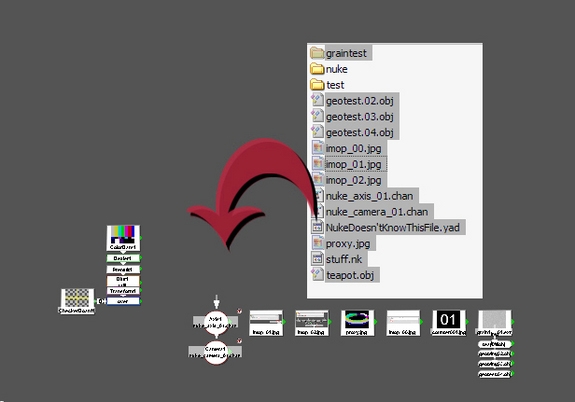
This is a beefed up version of the drop.tcl that ships with Nuke.
It will need the compressList.tcl installed in Nuke's plugin path
Existing features:
dropping image files into the DAG will create Read nodes
dropping a nuke script (or nuke autosave script) will merge those nodes with the current script
New features:
dropping an obj into the DAG will create a ReadGeo node
A chan file will create a Camera or an Axis node depending on it's file content
Files that aren't supported by Nuke will be ignored instead of creating a Read node in error

Sequence handling:
when sequential files are dropped the user can chose between the following options:
- "as sequence" - creates one Read node per sequence found in the dropped files
- "as stills" - always creates one Read node for each frame
- "only folders as sequence" - multiple files will always be read as single frames but if the dropped files contain directories, their content will be read in as a sequence (if they contain sequential files)
- "always prompt" - the user will be asked for every sequence found in the dropped files
With these new options the user can drag a whole bunch of files into Nuke at once and control the results on the fly.
To set a default behaviour for drag&drop action an optional preference file can be set up, these are the supported preferences at the moment:
- silent mode - set your preferred drag&drop action and bypass the gui
- ask for vaperture (for cameras) - prompts for a vertical aperture if a camera chan file is dropped
- use ReadGeoPlus gizmo instead of default ReadGeo - only us if ReadGeoPlus is installed in your Nuke environment
create a file called $HOME/.nuke/drop.preference and put the following lines into it:
mode {}
va_prompt
ReadGeoPlus
The following modes are supported:
- as sequence - always import subsequent frames as a sequence (singe Read/ReadGeo node)
- as stills - always create one Read/ReadGeo node for each file
- only folders as sequence - only sequences within a folder are read into a single Read/ReadGeo node
- always prompt - always ask the user every time a sequence is found
Set 'ReadGeoPlus' to 1 to use the ReadGeoPlus gizmo - only do this if you have the gizmo installed in your plugin path.
Example:
mode {only folders as sequence}
va_prompt 1
ReadGeoPlus 1
va_prompt 1
ReadGeoPlus 1
There is an example in the zip file.
Please use the Bug System to report any bugs.
Please use the Feature Requests to give me ideas.
Please use the Support Forum if you have any questions or problems.
Please rate and review in the Review section.
Please use the Feature Requests to give me ideas.
Please use the Support Forum if you have any questions or problems.
Please rate and review in the Review section.