Fix Broken Render Layers!!
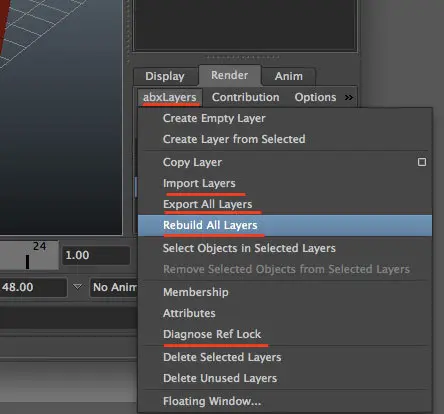
Maya's render layers are notoriously stubborn, often breaking when reopening scenes or when working with referencing in a production pipeline. I designed these tools to overcome and recover scenes and render layers suffering from these problems. This script extends the Layer Editor menus to include function to do the following:
- instantly rebuild all render layers, even locked layers
- import and export your render layers between scene files
- diagnose locked layers to find out what nodes are missing
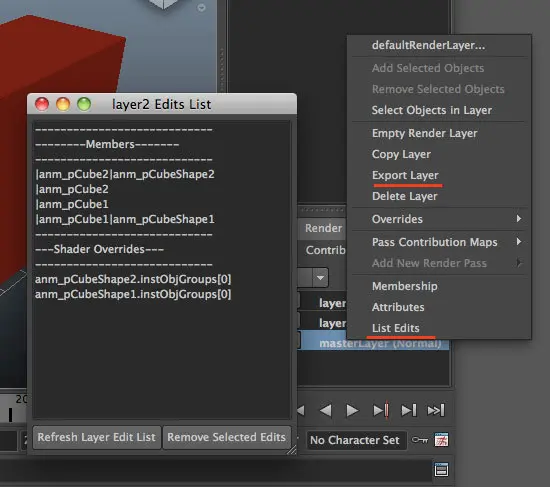
- interface to list and remove individual layer members, overrides, and shader overrides
Install:
source and execute abxRenderLayers();
Your render layer editor menu will change from "Layers" to "abxLayers" and you'll find new menu items there as well as the right-click menu's for each layer.
Check The Forums Tab for Documentation and Tips on Using abxRenderLayers to fix broken renderLayers
Documentation:
Update (March 17th, 2011)
- fixed bug on overridden connections causing rebuilds to error
Update (July 22nd, 2012)
- fixed bug preventing it from supporting future versions
- now matches maya's behavior of handling name clash overrides
Update (June 16th, 2015)
- added a reference purge for the layer to remove unclean ref edits that bloat scenes up
- import multiple render layers at once
- prevents children of render layer members from adding themselves when reimporting
- added support for Maya 2016
Please use the Bug System to report any bugs.
Please use the Feature Requests to give me ideas.
Please use the Support Forum if you have any questions or problems.
Please rate and review in the Review section.