





Ninja Topo
A script to retopologize meshes.
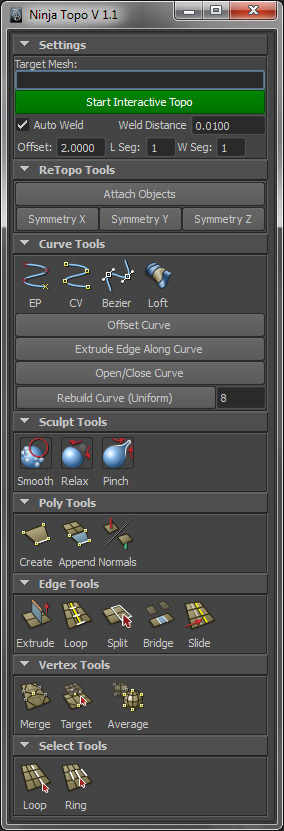
1. select the mesh you want to retopologize then click [Start Interactive Topo]
This will make the object live and will conform the mesh to the target Mesh.
2.You can create a curve on the mesh. Then click Offset Curve. This will create a poly strip for you. From there you can extrude edges, move verts/edges/faces..
Or you can start it by creating a polyface
For more Ninja Tools you can check out the Ninja Dojo.
If you already Have Ninja Dojo. You can simply copy the mel file into the /Ninja_Dojo/Bonus/ directory.
Ninja Topo 1.3
1. Added Align X Y Z. This will average component selection to the corresponding axis
2. Added a custom Ninja Topo Shelf. You can drag and drop icons into the custom shelf.. Right Click to save the shelf
3. Shader/Display Settings are in its own Frame now.
4. Set the default shader settings to be better.
5. added Display only hard edges for the Target mesh.
6. Added Double sided settings for the Topo Mesh.
A script to retopologize meshes.
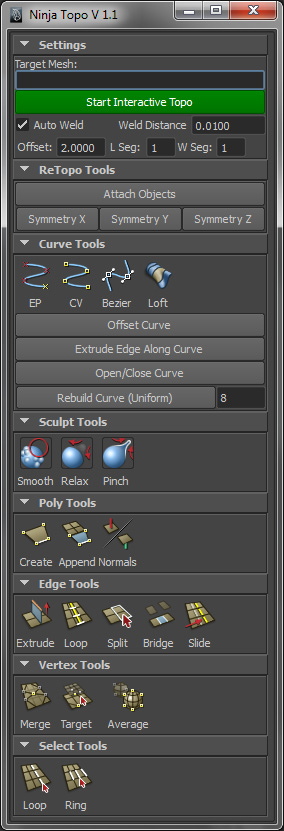
1. select the mesh you want to retopologize then click [Start Interactive Topo]
This will make the object live and will conform the mesh to the target Mesh.
2.You can create a curve on the mesh. Then click Offset Curve. This will create a poly strip for you. From there you can extrude edges, move verts/edges/faces..
Or you can start it by creating a polyface
For more Ninja Tools you can check out the Ninja Dojo.
If you already Have Ninja Dojo. You can simply copy the mel file into the /Ninja_Dojo/Bonus/ directory.
Ninja Topo 1.3
1. Added Align X Y Z. This will average component selection to the corresponding axis
2. Added a custom Ninja Topo Shelf. You can drag and drop icons into the custom shelf.. Right Click to save the shelf
3. Shader/Display Settings are in its own Frame now.
4. Set the default shader settings to be better.
5. added Display only hard edges for the Target mesh.
6. Added Double sided settings for the Topo Mesh.
Please use the Bug System to report any bugs.
Please use the Feature Requests to give me ideas.
Please use the Support Forum if you have any questions or problems.
Please rate and review in the Review section.
Please use the Feature Requests to give me ideas.
Please use the Support Forum if you have any questions or problems.
Please rate and review in the Review section.


