

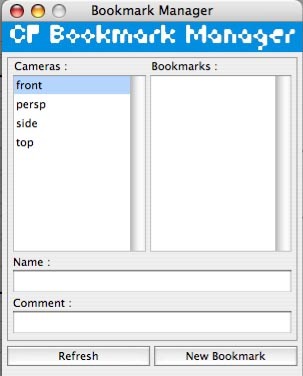
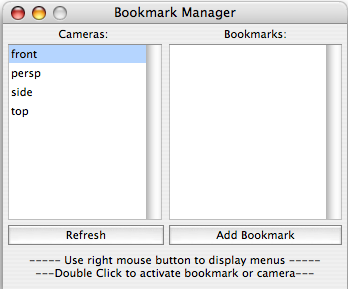

This script allows users to manage their camera bookmarks in an easy way,
Export and Import bookmark to file and some extra features
how to use:
- click on a camera name to see all available (existing) bookmarks in the list below
- right-click on a camera name to get a popup menu
- double-click on a camera name to look through that camera
- right-click on a bookmark to get a popup menu
- double-click on a bookmark to make it active
For Install :
OSX : copy
cf_bookmarkManager.mel to /Users/UserName/Library/Preferences/Autodesk/maya/2008/scripts/
cfBookmarkManager.jpg to /Users/UserName/Library/Preferences/Autodesk/maya/2008/prefs/icons/
Windows : copy
cf_bookmarkManager.mel to
C:/Documents and Settings/UserName/My Documents/maya/2008/scripts
cfBookmarkManager.jpg to
C:/Documents and Settings/UserName/My Documents/maya/2008/prefs/icons
for request or suggestion send me a e-mail at colas@skynet.be
Please use the Bug System to report any bugs.
Please use the Feature Requests to give me ideas.
Please use the Support Forum if you have any questions or problems.
Please rate and review in the Review section.
Please use the Feature Requests to give me ideas.
Please use the Support Forum if you have any questions or problems.
Please rate and review in the Review section.


