Version 2 boasts:
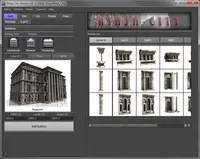
- a much more intuitive UI
- proper script editor text input in the UI
- conversion utility for converting older trigger objects to the v2 format
- complete integration with zooObjMenu - for adding commands to an object's right click menu
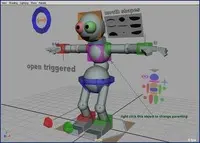
The coolest use for this script that I've discovered is to build viewport HUD buttons. These are very similar to armatures in messiah, for those familiar with messiah. The buttons are essentially geometry parented to the camera, but when they're selected, scripted commands attached to them are executed.
this allows you to create small character outlines, parented to your camera, which allow you to select character controls, or hide/unhide parts of your character, or open parts of the interface etc...
You can also use the script to change the manipulator when an object is selected. For example you could change to the move tool whenever a elbow pole vector is selected for example.
For more information, read the tutorial in the help that comes with the script - or check out the tutorial on animationtd.com
Please use the Feature Requests to give me ideas.
Please use the Support Forum if you have any questions or problems.
Please rate and review in the Review section.