
svm_tweenMachine 0.0.4 for Maya (maya script)
Quick, automatic way to get inbetween poses for animation.
Bugs
Scale the window
| Status | closed |
|---|---|
| Priority | medium |
| Date | 03/19/2019 |
| Submitted by |
 Stijn |
| Modify this bug | edit |
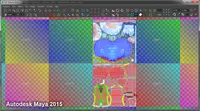
Hello, nice tool and very useful, and I have found a little bug, when I am scaling window to be more precise only slider is scaling but the buttons remain in their initial position. will be very nice if they will move acordingly the slider.
Thanks



Comments on this bug:
Stijn said over 7 years ago:
Stijn said over 7 years ago:
I've been researching for a way to make the button positions scale while still giving a correct representation of their position compared to the slider value. Unfortunatly I've been unable too perfectly match it in all window widths. Because of this, I rather have the button positions not scale since I believe a wrong visual representation of values for the slider is counterproductive.
Alex Florica said over 7 years ago:
string $form = `formLayout -numberOfDivisions 100`;
string $btn_1 = `button -w 2 -h 2 -l ""`;
string $btn_2 = `button -w 2 -h 2 -l ""`;
string $btn_3 = `button -w 2 -h 2 -l ""`;
string $btn_4 = `button -w 2 -h 2 -l ""`;
string $btn_5 = `button -w 2 -h 2 -l ""`;
string $btn_6 = `button -w 2 -h 2 -l ""`;
string $btn_7 = `button -w 2 -h 2 -l ""`;
string $btn_8 = `button -w 2 -h 2 -l ""`;
string $btn_9 = `button -w 2 -h 2 -l ""`;
string $btn_10 = `button -w 2 -h 2 -l ""`;
string $btn_11 = `button -w 2 -h 2 -l ""`;
string $btn_12 = `button -w 2 -h 2 -l ""`;
string $btn_13 = `button -w 2 -h 2 -l ""`;
string $btn_14 = `button -w 2 -h 2 -l ""`;
string $btn_15 = `button -w 2 -h 2 -l ""`;
string $btn_16 = `button -w 2 -h 2 -l ""`;
string $btn_17 = `button -w 2 -h 2 -l ""`;
int $udo1 = 15;
int $udo2 = 10;
int $udo3 = 1;
int $upl = 3;
int $downl = 97;
formLayout -edit -attachPosition $btn_1 "top" $udo2 $upl -attachPosition $btn_1 "left" 3 0
-attachPosition $btn_1 "bottom" $udo2 $downl -attachPosition $btn_1 "right" 1 5
-attachPosition $btn_2 "top" $udo1 $upl -attachPosition $btn_2 "left" 1 6
-attachPosition $btn_2 "bottom" $udo1 $downl -attachPosition $btn_2 "right" 2 11
-attachPosition $btn_3 "top" $udo1 $upl -attachPosition $btn_3 "left" 1 12
-attachPosition $btn_3 "bottom" $udo1 $downl -attachPosition $btn_3 "right" 2 17
-attachPosition $btn_4 "top" $udo1 $upl -attachPosition $btn_4 "left" 1 18
-attachPosition $btn_4 "bottom" $udo1 $downl -attachPosition $btn_4 "right" 2 23
-attachPosition $btn_5 "top" $udo3 $upl -attachPosition $btn_5 "left" 1 24
-attachPosition $btn_5 "bottom" $udo3 $downl -attachPosition $btn_5 "right" 2 29
-attachPosition $btn_6 "top" $udo1 $upl -attachPosition $btn_6 "left" 1 30
-attachPosition $btn_6 "bottom" $udo1 $downl -attachPosition $btn_6 "right" 2 35
-attachPosition $btn_7 "top" $udo1 $upl -attachPosition $btn_7 "left" 1 36
-attachPosition $btn_7 "bottom" $udo1 $downl -attachPosition $btn_7 "right" 2 41
-attachPosition $btn_8 "top" $udo1 $upl -attachPosition $btn_8 "left" 1 42
-attachPosition $btn_8 "bottom" $udo1 $downl -attachPosition $btn_8 "right" 2 47
-attachPosition $btn_9 "top" $udo3 $upl -attachPosition $btn_9 "left" 1 48
-attachPosition $btn_9 "bottom" $udo3 $downl -attachPosition $btn_9 "right" 2 53
-attachPosition $btn_10 "top" $udo1 $upl -attachPosition $btn_10 "left" 1 54
-attachPosition $btn_10 "bottom" $udo1 $downl -attachPosition $btn_10 "right" 2 59
-attachPosition $btn_11 "top" $udo1 $upl -attachPosition $btn_11 "left" 1 60
-attachPosition $btn_11 "bottom" $udo1 $downl -attachPosition $btn_11 "right" 2 65
-attachPosition $btn_12 "top" $udo1 $upl -attachPosition $btn_12 "left" 1 66
-attachPosition $btn_12 "bottom" $udo1 $downl -attachPosition $btn_12 "right" 2 71
-attachPosition $btn_13 "top" $udo3 $upl -attachPosition $btn_13 "left" 1 72
-attachPosition $btn_13 "bottom" $udo3 $downl -attachPosition $btn_13 "right" 2 77
-attachPosition $btn_14 "top" $udo1 $upl -attachPosition $btn_14 "left" 1 78
-attachPosition $btn_14 "bottom" $udo1 $downl -attachPosition $btn_14 "right" 2 83
-attachPosition $btn_15 "top" $udo1 $upl -attachPosition $btn_15 "left" 1 84
-attachPosition $btn_15 "bottom" $udo1 $downl -attachPosition $btn_15 "right" 2 89
-attachPosition $btn_16 "top" $udo1 $upl -attachPosition $btn_16 "left" 1 90
-attachPosition $btn_16 "bottom" $udo1 $downl -attachPosition $btn_16 "right" 2 95
-attachPosition $btn_17 "top" $udo2 $upl -attachPosition $btn_17 "left" 1 96
-attachPosition $btn_17 "bottom" $udo2 $downl -attachPosition $btn_17 "right" 2 100
$form;
showWindow $test_window;
Stijn said over 7 years ago:
Thank you very much for your suggestion!
The last update I posted, was actually done with a formLayout where I also attached the buttons to a position, but as you can see it did not align well. But now, having ran your sample code, the behaviour of scaling seems much better! I'm intrigued :)
I'm busy with my animtion work now, but I'll do some testing, implementing your code later this week.
Thank you again for helping! I'll keep you up-to-date.
Stijn said over 7 years ago:
(I'm having trouble again uploading an image, I'll try in a new comment. Also the @user doesn't seem to work on any browser I tried, so I don't know if you get notified of these posts.)
Stijn said over 7 years ago:
And a big thanks for your help already!
Alex Florica said over 7 years ago:
Stijn said over 7 years ago:
It's indeed looking close. Well done! I'll be giving it a more indepth look when I have some more time to script again.
You leave me a bit scratching my head at times, which is good. :D
It's funny how the UI is often the most challenging part. :)
Stijn said over 7 years ago:
Thank you very much for all the help you've given me here regarding the issue. I very much appreciate it.
Best regards,
Stijn