Description:
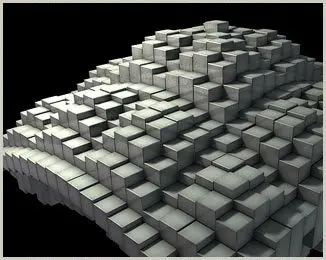
This script lets you instance an object a number of times in Y and Z.
Each individual objects attributes Visibility, TranslateY and ScaleY
can be easily adjusted and animated, using textures. |
|
 Instructions:
- Select the object you want to instance.
- Choose the number of instances in X and Z direction. (higher values above 40*40 take quite long to calculate)
- All instances are grouped under a node called "instanceGroup"

-
The settings, as well as the connections of the textures to the
instanced objects are stored in the "mmInstanceArraySettings" node.
Pipe any textures into that node in order to drive the various
attributes via expressions. After adjusting an attribute in any of the
connected textures, you need to scrub through the timeline in order to
see the effect.

|
|
Bugs, Limitations and Workarounds:
- While
instancing the objects, a status bar pops up. Even though it states
"Press ESC to Cancel", it's not possible to interrupt that process.
This is especially critical if a huge amount of instances is being
created.
- After adjusting an
attribute in any of the connected textures, you need to scrub through
the timeline in order to see the effect.
- There
can only be one instanceArray in a scene, due to some name-clashes. A
workaround would be to create various arrays, each in a scene of their
own and then to import all of them into the final scene.
|
Please use the
Bug System to report any bugs.
Please use the
Feature Requests to give me ideas.
Please use the
Support Forum if you have any questions or problems.
Please rate and review in the
Review section.