Note: standart built-in maya 7.0 plugin "NearestPointOnMesh.mll" must be loaded.
On english:
Script that make mirroring of skin weights like standart built in MirrorSmoothSkinWeights.
Standart tool not ideal, it works bad on vertices that is in the middle of mirror-axis. Also it not work good with vertices that have weights on joints in both sides of mirror axis. Example: vertex lay on -X and have this weight: Pelvis 0.2, Left thigh 0.3, Right thigh 0.5. After mirroring with standart tool on the opposite vertex on +X you'll have weights like this - Pelvis 0.2, Right Thigh 0.8. This script will create ideal mirrored weight: Pelvis 0.2, Left thigh 0.5, Right thigh 0.3. If this vertex is in the middle of mirror-axis (maximum 0.01 unit distanced from 0 of axis) it weight will be - Pelvis 0.2, Left thigh 0.4, Right thigh 0.4.
How to use:

Script that make mirroring of skin weights like standart built in MirrorSmoothSkinWeights.
Standart tool not ideal, it works bad on vertices that is in the middle of mirror-axis. Also it not work good with vertices that have weights on joints in both sides of mirror axis. Example: vertex lay on -X and have this weight: Pelvis 0.2, Left thigh 0.3, Right thigh 0.5. After mirroring with standart tool on the opposite vertex on +X you'll have weights like this - Pelvis 0.2, Right Thigh 0.8. This script will create ideal mirrored weight: Pelvis 0.2, Left thigh 0.5, Right thigh 0.3. If this vertex is in the middle of mirror-axis (maximum 0.01 unit distanced from 0 of axis) it weight will be - Pelvis 0.2, Left thigh 0.4, Right thigh 0.4.
How to use:
Create shelf button with text:
mirrorWeights ""
now select object or vertices and press shelf button. Script will do mirroring from -X to +X. If you press shelf button with Ctrl - script will do mirroring from +X to -X. X - it is default axis, if you want to change default axis, just change it in the begining of the script. If you selecting vertices, this means that you do not want to change weights of other vertices that you don't select.
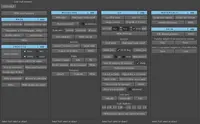
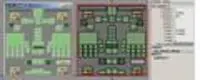
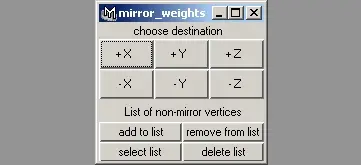
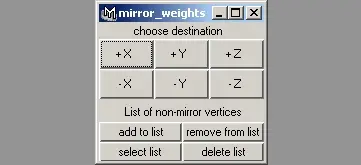
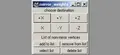
Pressing shelf button with Alt will open window:
in the bottom 4 buttons to create and change list of vertices that you don't want to mirror.
to quick add vertices to list - just press Shift + shelf button. To select list - select none than press Shift + shelf button.
Script is not quick - near 90 seconds on model with 5000 triangles. If you don't want to wait so long time - just use standart mirror weights tool, select vertices on at example +X, but don't select middle vertices, than use this script to create ideal mirroring in problemed places - on middle vertices and vetices that have weights on both sides of mirror-axis.
Russian:
Please use the Bug System to report any bugs.
Please use the Feature Requests to give me ideas.
Please use the Support Forum if you have any questions or problems.
Please rate and review in the Review section.
Please use the Feature Requests to give me ideas.
Please use the Support Forum if you have any questions or problems.
Please rate and review in the Review section.