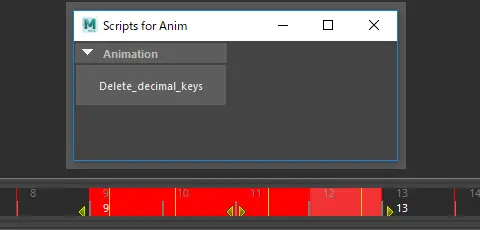
We often scale animation, set new keyframes, and get annoyed with decimal keyframes nearby.
This is a script for deleting decimal keyframes with region selection in time slider.
I was inspired and learned a lot from John Patrick's "jpKeyframeTools.mel". Thank you so much, John.
How to install:
1, Put this script in script folder like here.
C:\Users\user\Documents\maya\2018\scripts
2,Run lines below in python tab.
import del_decimal_key_ui
reload(del_decimal_key_ui)
del_decimal_key_ui
How to use:
1, Select controller objects that have keyframes.
2, Set range in time slider by SHIFT+DRAG.
3, Push the button.
Please use the Bug System to report any bugs.
Please use the Feature Requests to give me ideas.
Please use the Support Forum if you have any questions or problems.
Please rate and review in the Review section.
Please use the Feature Requests to give me ideas.
Please use the Support Forum if you have any questions or problems.
Please rate and review in the Review section.