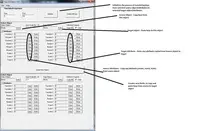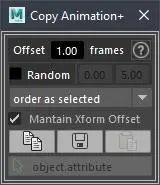
This script allows you to copy one object animation to a bunch of others with a simple click.
The animation can be offsetted for each object.
It also works by selecting the attributes(s) in the Channel Box (works with main, shape and history attributes from Channel Box).
You can also store some object.attribute animation and paste it into some other object.attribute. For instance copy the animation curve from some object's rotationY into some other scaleZ.
The animation can be offsetted for each object.
It also works by selecting the attributes(s) in the Channel Box (works with main, shape and history attributes from Channel Box).
You can also store some object.attribute animation and paste it into some other object.attribute. For instance copy the animation curve from some object's rotationY into some other scaleZ.
Version: 2.0.0
Date: August 31, 2019
- UI Redesign
- Bug fixing.
Date: August 31, 2019
- UI Redesign
- Bug fixing.
LAUNCH UI:
cra_copyAnim();
Please use the Bug System to report any bugs.
Please use the Feature Requests to give me ideas.
Please use the Support Forum if you have any questions or problems.
Please rate and review in the Review section.
Please use the Feature Requests to give me ideas.
Please use the Support Forum if you have any questions or problems.
Please rate and review in the Review section.