


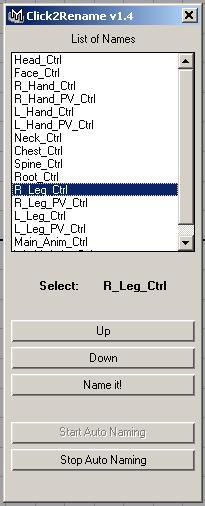
Click2Rename v1.4

Infos:
Put Controls as it is, while you RIG a character. Never waste time typing the Control Name!
Once you completed RIGGING. Its time to name the controls using .... Click2Rename.
Start the Script.... (Execute: Click2Rename)
1.Click - Start Auto Naming
2.See the SELECTED NAME from the LIST... then just click the appropriate control in your RIG.
3.Bingo... Control is Renamed!
It'll quickly switches to the next name...
You just keep clicking the approprite controls to RENAME!
Oops! You made a mistake???? Don't worry!
-Just Undo using z or ctrl+z
-Click UP or DOWN. (You can even select directly from the LIST).
-then Proceed Clicking the Controls....
Use:
-No need to TYPE the names.
-You can maintain same NAMING COVERSION for all your characters.
-Once you are familiar with your LIST. You don't need to LOOK the LIST.
Just Click2Rename!
By:
-Kumaresan
Accel Animation Studio (INDIA)
Date:
4-3-2007
Please use the Bug System to report any bugs.
Please use the Feature Requests to give me ideas.
Please use the Support Forum if you have any questions or problems.
Please rate and review in the Review section.
Please use the Feature Requests to give me ideas.
Please use the Support Forum if you have any questions or problems.
Please rate and review in the Review section.


