contains:
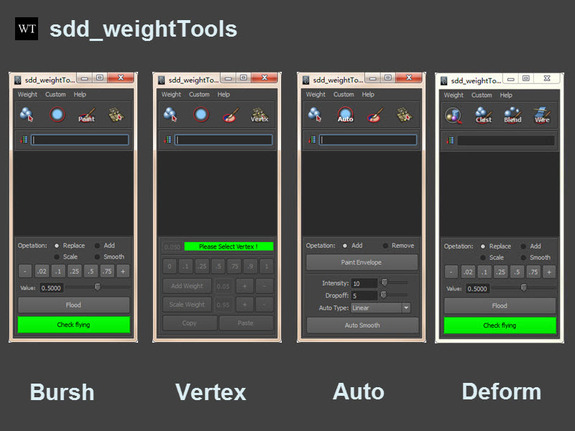
1.sdd_weightTools
v5.0.2:
1.Add maya2016 support sdd_weightTools_2016_x64.mll
v5.0.1 :
1. Vertex mode add vertex selection button,"Ring" "Loop" "Elem" "Shri Grow"
2. Repair the bug of vertex mode abnormal exits ,Right-click menu without switch
3. Auto Smooth selection change UI enable and sort
4.W E R keys,can quit current model.
2.sdd_rigTools and sdd_bsTools
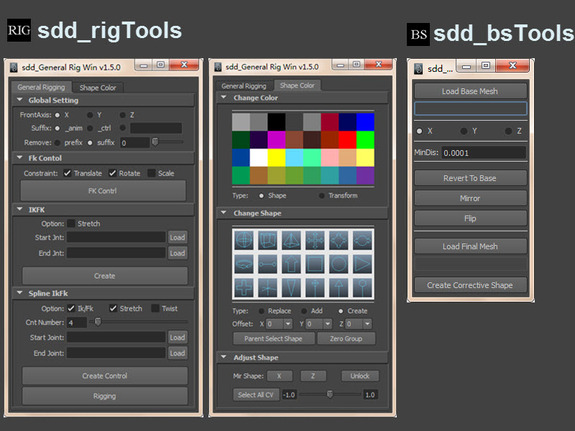
Quickly create controller, color and shape
The most rapid blendshape tool
update:
sdd_bsTools:
v1.5:
1.Updated UI
2.Add blendshape subtraction function
3.sdd_UIDesigner
Click the button to create the UI,If you don't know how to program, you can also create your own UI
Support: maya 2013 and higher ,exoprt code Support all varsion(You need to select the controls and parameters that support)




contains:
1.sdd_weightTools
v5.0.2:
1.Add maya2016 support sdd_weightTools_2016_x64.mll
v5.0.1 :
1. Vertex mode add vertex selection button,"Ring" "Loop" "Elem" "Shri Grow"
2. Repair the bug of vertex mode abnormal exits ,Right-click menu without switch
3. Auto Smooth selection change UI enable and sort
4.W E R keys,can quit current model.
2.sdd_rigTools and sdd_bsTools
Quickly create controller, color and shape
The most rapid blendshape tool
update:
sdd_bsTools:
v1.5:
1.Updated UI
2.Add blendshape subtraction function
3.sdd_UIDesigner
Click the button to create the UI,If you don't know how to program, you can also create your own UI
Support: maya 2013 and higher ,exoprt code Support all varsion(You need to select the controls and parameters that support)
4. sdd_CorrectiveBSTools
Install:
1. Extract the compressed package to any drive
2. The folder ..\sdd_riggingTools drag install.mel into Maya