Download the latest version here
To install, simply drag the .mzp file into 3dsmax and follow the instructions.
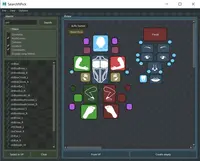
Screenshots:
Hierarchy Mode:


Layer Mode (including nested layers)

Material Mode (beta)

Compared to the previous version (1.6.1), there are many improvements. Most notable among them are: hugely increased performance, improved stability, nested layer support and many small tweaks to improve the ease of use.For a list of all changes, click here
To support the development of this tool, and to show your appreciation of it, please consider making a small donation through paypal
After making a donation of any amount, you'll receive a copy of the Outliner Workflow tools, which include:
* Viewport tools (hide toggle, freeze toggle)
* Parent to last selected
* Delete recursive
* Advanced rename
* Clone without renaming
Sending the workflow tools to you may take a couple of days, since it has to be done manually (for now).
To install, simply drag the .mzp file into 3dsmax and follow the instructions.
Please use the Bug System to report any bugs.
Please use the Feature Requests to give me ideas.
Please use the Support Forum if you have any questions or problems.
Please rate and review in the Review section.
Please use the Feature Requests to give me ideas.
Please use the Support Forum if you have any questions or problems.
Please rate and review in the Review section.