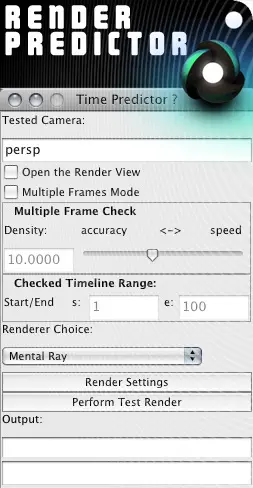
Render Timer
© 2008 Max Boughen
www.maxtextures.com
--------------------------------------------------------------
This tool allows the user to predict the length of time a large batch render will take to complete. It will consider the different frames within the duration of the batch render and predict the total amount of time it will take to render. It will do this by rendering certain frames within the frame duration. The accuracy vs time to calculate can be altered.
To Use:
Execute MEL in script editor.
- Tested Camera
Enter the name of the camera you want to render from in the field named 'Tested Camera'.
- Open the Render View
This will show you the test renders being performed in the render view if ticked.
- Multiple Frames Mode
The commonly used setting to say you wish to check over a series of frames.
- Multiple Frame Check
Depending on the range you have specified, you are able to select the accuracy of the predicted time for render.
More accuracy - More of the frames throughout the range will be rendered.
More speed - Less frames throughout the range will be rendered.
- Checked Timeline Range
Specify the range in which to test. 's' Start, 'e' End.
- Renderer Choice
Select your renderer to use.
- Render Settings
Opens up your render settings.
- Perform Test Render
Begins the test.
- Output
Show the result of the tests.
Please use the Bug System to report any bugs.
Please use the Feature Requests to give me ideas.
Please use the Support Forum if you have any questions or problems.
Please rate and review in the Review section.
Please use the Feature Requests to give me ideas.
Please use the Support Forum if you have any questions or problems.
Please rate and review in the Review section.