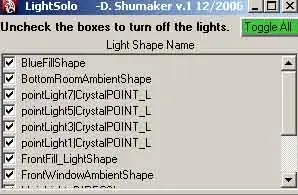
are contributing what to your renders. Inspired by a similar tool at ILM.
All it does is switch on and off the "Illuminates by Default" flag for
each light that you check or uncheck. Sort of like the other solo light script on highend3d but this doesn't initiate a render.
Installation :Put the script in your scripts folder then start Maya. Make sure that
you name the file properly. If you download it from www.highend3d.com
you'll have to take out the extra characters between the "LightSolo" and
".mel". Usually these extra characters include the version number. Type
"rehash;". Then type "LightSolo" in command line or Script
Editor, an UI window will appear.
How to use:
To solo a light use the "TOGGLE ALL" button to turn all the lights off.
Then check the check box for the light that you want to be on. Then
render, it is as simple as that. You can also turn any other lights on or off as you wish. Have fun!
Please use the Bug System to report any bugs.
Please use the Feature Requests to give me ideas.
Please use the Support Forum if you have any questions or problems.
Please rate and review in the Review section.
Please use the Feature Requests to give me ideas.
Please use the Support Forum if you have any questions or problems.
Please rate and review in the Review section.