




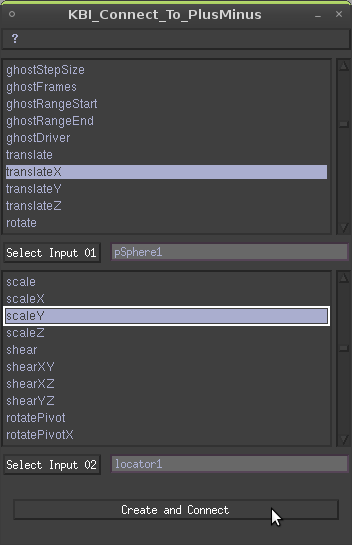


DESCRIPTION:
This script create a plusMinusAverage node and connect two given attributes to the input1D.
TESTED ON :
Maya 2009 Unlimited - Linux (Ubuntu 8.10) - 64bits
Maya 2009 Unlimited - Windows Xp SP3 - 32bits
HOW TO USE IT:
How to install the script
Put the script in your user scripts directory :
- Windows: C:/Documents and Settings/USER_NAME/My Documents/maya/2009/scripts/
- Linux: /home/USER_NAME/maya/2009/scripts/
Change USER_NAME by yours and 2009 if you have another version of maya
(exemple: C:/Documents and Settings/J.Doe/My Documents/maya/8.5/scripts/ )
In maya, source the script then put KBI_Connect_To_PlusMinus; in the command line to load the script.
How to use the script
Select the first object you want to connect and press the Select Input 01″ button, select the attribute in the textscrollList, it will be connected to the input1D[0].
Do the same for the second attribute and hit Create and Connect.
VERSIONS:
1.0 - 2009.02.15 - Initial Release.

Please use the Bug System to report any bugs.
Please use the Feature Requests to give me ideas.
Please use the Support Forum if you have any questions or problems.
Please rate and review in the Review section.
Please use the Feature Requests to give me ideas.
Please use the Support Forum if you have any questions or problems.
Please rate and review in the Review section.


