

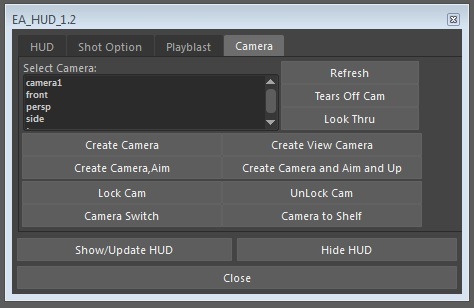


EA_HUD has 4 parts which are HUD,Camera Options Playblast and Camera.The script allows you to generate some HUD information, set camera setting options and take a playblast which format size you want.
Installation
1)Place EA_HUD.mel to your maya scripts folder.
1)Place EA_HUD.mel to your maya scripts folder.
2)Run EA_HUD_1_3 on mel.
_HUD_
User name, scene name and date are shown on GUI automatically.If you want to change user name, you can do.However, scene name and date are not changeable.
Selected camera name is shown.
You can use Status part for specifying phase which you are in and if you want to take a note about scene,you can use note part.
Beginning and last frame number are shown.If you change frame number, click on get first and last frames button.It refreshes frame numer
Beginning and last frame number are shown.If you change frame number, click on get first and last frames button.It refreshes frame numer
The script displays HUD information, when you click on Show/Update HUD button:
User Name, Scene Name, Date, Camera Name, Status, Note, Frame.
User Name, Scene Name, Date, Camera Name, Status, Note, Frame.
(If checkbox is enable ,then it makes element visible.
If checkbox is disable ,then it makes element invisible.)
_Shot Gates_
On/Off options for:
On/Off options for:
Film Gate Resolution Gate
Gate Mask Field Chart
Safe Action Safe Title
Gate Mask Field Chart
Safe Action Safe Title
Set overscan to 1.3
Change color of HUD elements
_Playblast_
Give a name for playblast file.
Click on imagine size and take a playblast automatically.
Give a name for playblast file.
Click on imagine size and take a playblast automatically.
Enjoy.
Please use the Bug System to report any bugs.
Please use the Feature Requests to give me ideas.
Please use the Support Forum if you have any questions or problems.
Please rate and review in the Review section.
Please use the Feature Requests to give me ideas.
Please use the Support Forum if you have any questions or problems.
Please rate and review in the Review section.


