


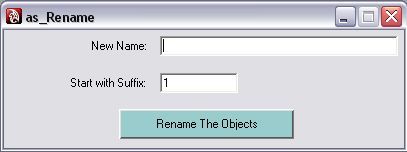
This is more useful for rigging and modeling job, where renaming of objects occur more frequently.
Command Usage :
---------------
1. Copy the script to the path like below (with change of Maya version)
C:Documents and SettingsAdministratorMy DocumentsMaya2008scripts
2. Type the following command in Script Editor in Python tab:
from AsRename import *
name.as_Rename()
Using the Window:
----------------------

1. Select the required objects for renaming in Maya scene
2. Type new name in the New Name section and Suffix start no in Suffix section
3. Press the Rename The Objects button to rename all
for any updates please email to:
subbu_add@yahoo.com
Subbu.
Firefly Creative Studios, Hyderabad
Please use the Bug System to report any bugs.
Please use the Feature Requests to give me ideas.
Please use the Support Forum if you have any questions or problems.
Please rate and review in the Review section.
Please use the Feature Requests to give me ideas.
Please use the Support Forum if you have any questions or problems.
Please rate and review in the Review section.


