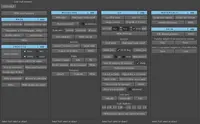
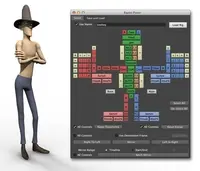
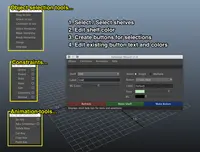
animSelector - the fast picker! 1.3.5 for Maya (maya script)
A quick way to set hotkeys for your character rig
Version History
# ##################################################################################
# ChangeLog
# ##################################################################################
# > animSelector 1.3.5
#
# *Fixed button order and color when saved in the original file (the one that gets referenced)
# Now it gets loaded correctly and remember the layout.
# Please note that if you have more than one "charName" in the original scene only the first one will work
#
# ##################################################################################
# > animSelector 1.3.4
#
# *Picker window is now dockable
# Please note that this is available only from Maya 2011.
# If you don't like it, you can switch to the old window from the preferences
#
# *Changed namespaces finding algorithm
#
# *Added scrollbar to picker
#
# *Removing sets from the picker now checks for namespace
#
# *Added 'Rename Button' to picker window
#
# *Fixed a bug on 'get name from picker'
#
# *Cancel button on namespace chooser window now properly cancel the import
#
# *Fixed a bug on Maya2011
# The 'fcc' flag for dockControl is not available on Maya2011. The picker will not mantain his position betwee sessions
# in this version.
#
# *Removed 'keyable=True' flag on custom attributes
#
# ##################################################################################
# > animSelector 1.3.3
#
# *Changed custom attribute names
# Seems that some people had issues with the "Morpheus Rig" because we we using the same naming convention (Argh!)
# I changed the names to something more specific.
# Please keep in mind that old setups will not work anymore.
# However, you can update them to the new version from the update menu un the setup window.
#
# *Improved namespace handling when importing
# You can now export a setup from a non referenced file and import in a referenced one
#
# *Button colors and position is exported with the setup now
#
# ##################################################################################
# > animSelector 1.3.2
#
# *New button on the setup window
# There is a small button near the "char name" field on the setup window.
# It fills the "char name" field with the current active tab on the picker
# (if the window is open).
# This was a request to keep consistency with weird and long names
# (like superMarioPartyVersionNoPants)
#
# *Preferences window
# You can now modify the colors and the names for the "Change buttons color" menu.
# The idea is that you can use the color name as the menu entry, or a body part
# (like 'head' for red, 'left' for green ecc ecc)
# Added picker buttons size
#
# *Extra > Backup hotkey on picker
# Now you can backup your current hotkeys before assigning new ones.
# ##################################################################################
# >animSelector 1.3.1
#
# *New names for the functions
# I have renamed the functions to make them more intuitive:
#
# SETUP WINDOW
# animSelector.SetupUI
#
# PIKER WINDOW
# animSelector.PickerUI
#
# *Preferences window
# There is a preference window accesible from the "Edit" menu on the setup window.
# Now you can chose the "hotkey selection toggle' (replace, toggle or add) from there.
#
# *UI get saved with the scene
# Buttons' color and position now get saved with the scene
# ##################################################################################
# > animSelector 1.3
#
# *Import/Export
# Added an import/export function in case you can't modify the reference file.
# The setup of the character can be exported to an external file (from the picker
# window) and then re-imported in another shot.
# There are two types of import (the can be chosen from the 'File' menu on the
# setup window).
# The normal import let you import the data back and re assing it to the same character.
# In case the namespaces are different between the shots, a window will popup
# letting you chose the correct one.
# There is also another import: 'Import and remap to new character'. This option
# lets you assign the setup to another character in the scene.
# The controls have to be the same, so it should be
# A) A second reference of the same file (like when you do duplicate reference
# from the reference editor
# B) A similar setup from the original file (like of crowds or extras)
#
# *Draggable Piker's Button
# Buttons on the picker are draggable, letting you reorganize the window as you
# prefer (like most used buttons on top).
# The behavior of the drag and drop is like this:
# if you have buttons A, B, C and D and you drop button D on the lower half of
# button B, D will go below button B.
# if you drop it on the upper half, it will go over button B
# FOR NOW BUTTON'S POSITION WILL RESET WHEN YOU CLOSE THE WINDOW
#
# *Colorable Buttons
# Now you can change the color of the buttons on the picker. Just right click and
# chose 'Change button color'
# FOR NOW BUTTON'S COLOR WILL RESET WHEN YOU CLOSE THE WINDOW
#
# *Maya like selection behavior
# I changed the way you select the controls when you click the button.
#
# - Normal click will replace the selection (select -r)
# - Shift + click will toggle the selection (select -tgl)
# - Ctrl + click will remove the object from the selection (select -d)
# - Shift + Ctrl + click will add the object to the selection (select -add)
#
# *Help
# There is a 'Help' entry in the menu. Text is still missing
# ##################################################################################
# > animSelector 1.1.0
#
# *Hotkey selection behavior
# Added the ability to change the hotkey behavior when calling the picker:
# - animSelector.checkCtrlNamesUI() is TOGGLE,
# - animSelector.checkCtrlNamesUI(1) is REMOVE
# - animSelector.checkCtrlNamesUI(2) is ADD
# ##################################################################################
# > animSelector 1.0.0
#
# *First release
# ##################################################################################