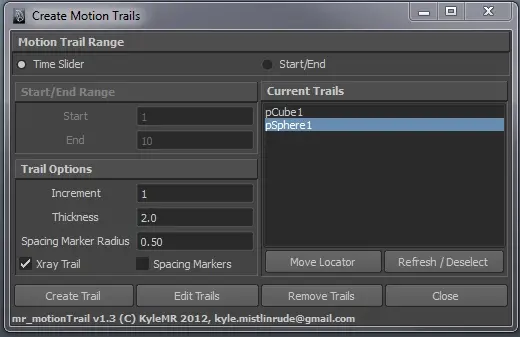
The spacing marker option creates visual markers identifying the position of the object on a frame by frame basis, even if the object being tracked is inheriting motion from another object (for instance, tracking a wrist that inherits motion from the body and upper arm).
Trails can be easily managed or removed using the built in trail list. You can double click an object listed in the trail list to select that object. Remove trails by highlighting objects in the trail list, or selecting them in the Maya viewport, then pressing 'Remove Trails'. Pressing 'Remove Trails' with no objects selected will remove all trails currently in the scene. Use the 'Edit Trails' to apply the settings in the UI to the selected trails, or to force a trail to update.
An example of the script in use can be seen at https://vimeo.com/43377702 at 2:45.
This script has been tested on Windows 7, using Maya 2012.
Please feel free to let me know if you have any questions or suggestions!
Please use the Bug System to report any bugs.
Please use the Feature Requests to give me ideas.
Please use the Support Forum if you have any questions or problems.
Please rate and review in the Review section.
Please use the Feature Requests to give me ideas.
Please use the Support Forum if you have any questions or problems.
Please rate and review in the Review section.