
Ctrl O 2.3.1 for Maya (maya script)
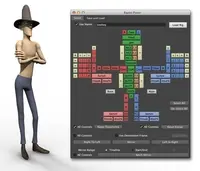
Tool to build your controllers faster, with a little viewport to preview the controllers, customizable controllers-shapes bank, mirroring abilities
Q/A
Inatsllation Error
| Date: | 05/08/2017 |
|---|---|
| Submitted by: |  Grayalzz |
Hello,
I followed the instruction:
- Unzip the zip file in C:\Users\Grayalzz\Documents\maya\scripts
- Then I typed the following script in my Python script tab in Maya :
import sys
sys.path.append(r'C:\Users\Grayalzz\Documents\maya\scripts')
import Ctrl_O
Ctrl_O.Display_CtrlO_UI()
sys.path.append(r'C:\Users\Grayalzz\Documents\maya\scripts')
import Ctrl_O
Ctrl_O.Display_CtrlO_UI()
And when I executed the script, I got this message :
# Error: line 1: AttributeError: file <maya console> line 4: 'module' object has no attribute 'Display_CtrlO_UI' #
I don't know where I went wrong, can you help me please >"<


Replies to this question:
mlouala said about 9 years ago:
arcticfoxpi said almost 9 years ago:
Pang Ren Tan said almost 9 years ago:
'C:\Users\Grayalzz\Documents\maya\scripts\Ctrl_O' should be
'C:\\Users\\Grayalzz\\Documents\\maya\\scripts\\Ctrl_O'
Should work because i had the same error and this pretty much made it work.