
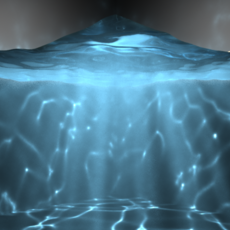
Fluid Caustic Volume Shader Setup for Maya 2014
1. Overview
This tutorial walks through the process of creating caustic effects in Autodesk Maya 2014 x64, using advanced shader techniques. It will be most useful to artists who already know some Maya basics: modeling, assigning materials, using the Channel Box, Attribute Editor (CTRL + A), Hypershade Window (Window > Hypershade: Hierarchy), and performing rendering operations (Render Current Frame, Batch Render, IPR, etc.)
Two key shaders we will be using for caustic effects:
-
“parti_volume”—this will be attached both to the shape that defines the volume for all caustic effect calculations, as well as the camera that will see them for rendering
-
“parti_volume_photon”—defines which surfaces will dissipate volume caustic photons into the calculation volume when struck by reflected and refracted caustic photons

Basic process for caustics effects: cast virtual photons from a light into a volume with (a) “parti_volume” shader assigned to it to define the photon boundary for the effect. Photons cast from that light will be refracted or reflected by (b) semi-transparent surfaces that have raytrace refractions enabled (which in this case is also deformed with an ocean shader for the water look), casting refractive and reflective caustics onto scene geometry. That same semi-transparent surface can also dissipate volume caustic photons if it also has (c) a mental ray “parti_volume_photon” shader attached. (NOTE: If you would like a light to cast volume caustics into the area above the water [i.e: for dust/light fog in the environment], you would have to put another plane directly in front of the light source to generate these photons). Caustic photons are then caught by (d) a "potonBoundary" geometry (a cube primitive with inside-out normals works fine) which has a reference to the "parti_volume" shader, then rendered by the mental ray renderer though (e) a camera that also has a reference to the same “parti_volume” shader.
Final render — video
To give credit where credit is due, the main motivation for this tutorial was the realization that volume shaders are not very well documented anywhere, and it was a real struggle to find tutorials online. I found the process so frustrating that I wanted to try and make it easier for the next poor sap that wants to make caustic effects. As a result, I cobbled this tutorial together using various others I found online, then did some rigorous testing, pulling apart different elements until I pared the process down to its core fundamentals. Tutorials I drew data from include:
-
Underwater lighting - parti_volume by Callum Ridley
-
Volume Caustics in Autodesk Maya 2013 by Samuel Liles
-
Let's make Volumetric Caustics in Maya! - Free Tutorial Weekly by Escape Studios
Comments
-
This is my first tutorial on CC, and look forward to hearing everyone's feedback!
-
The setup file has been approved! Please use the link in the tutorial from now on — http://www.creativecrash.com/maya/downloads/scene-files/c/causticsautodesk2014x64_02-0-0_scenesetup-ma (I'll be removing the file from gDrive soon). Thanks!
-
Wow. 1,345 views already. Has anyone had the chance to try it yet? Would love to hear your thoughts.
-
Dude wow! That was so awesome thanks so much!!! So clear. Only thing that got me was on page 6 the scattering took me a while to realise that number was a light/darkness value. Thanks again!
-
My pleasure! I added some comments on pp. 6–7 which should explain that better to the next person who reads it. Thanks for the feedback!
-
goood vey good
-
My pleasure… and sorry for the slow response. I've been busy.