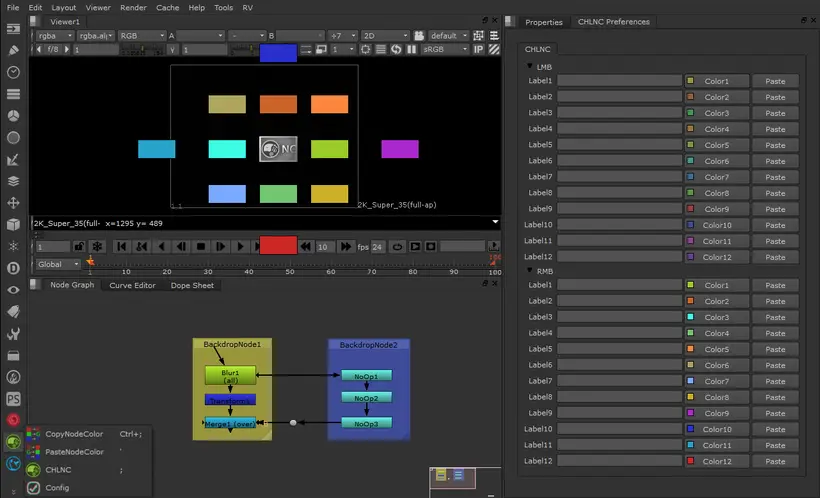
With CHLNC you can copy a node's color ,then paste to another.you can also make color presets of your favorite colors for quickly accessing.
CHLNC already comes with two groups of color presets,one for backdrop node,and the other for normal node.If the color presets are not enough, you can make addition.Simply open the config.xml file and change the number of both <LMBUsedColors> and <RMBUsedColors> to what you desire.
Platforms: Windows Mac Linux
Nuke: Nuke7.x Nuke8.x Nuke9.x
Installation:Extract CHL folder to your root drive(normally C drive),then go to .nuke folder open menu.py file(if it does not exist,create one),write nuke.pluginAddPath('Your root drive:/CHL/Nuke')--[normally nuke.pluginAddPath('C:/CHL/Nuke')] to it.
Usage:CHLNC icon will appear if you hit shortcut ';',left mouse button long press on it pop up backdrop node color presets,right mouse button long press on it pop up normal node color presets.You can hide the icon with middle mouse click it,if you want move it simply middle mouse long press and drag.
Please use the Bug System to report any bugs.
Please use the Feature Requests to give me ideas.
Please use the Support Forum if you have any questions or problems.
Please rate and review in the Review section.