Installation:
Place JC_pivotControl into your scripts folder.
Place pivotControl.bmp icon into your icons folder.
I've included the icon 'pivotControl.bmp' for you to add to your shelf.
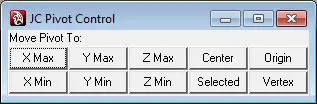
Using the command 'JC_pivotControl' will open the UI for pivot manipulations. These include: Min XYZ, Max XYZ, Center, Origin, Selected , and Vertex.
For 'Selected' make sure you select the mesh you wish to change the pivot for first, then select the object which pivot you want to use.
For Vertex, select one vertex on your object you wish to move your pivot to.
Let me know of any bugs and I'll try to fix them. Feel free to use and modify the script as you see fit for your own personal use.
I'll hopefully add a few more features to this, but let me know if you'd like to see any others..
Enjoy!
Tested in Maya 2008, but I have also used this in Maya 2013.
Please use the Bug System to report any bugs.
Please use the Feature Requests to give me ideas.
Please use the Support Forum if you have any questions or problems.
Please rate and review in the Review section.