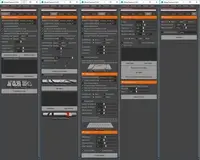
Edge mapping does not work properly. (I made a default pipe)
I get message "Spline Already Exists" and a curve is generated?
After confirming I get an error:
// Error: file: C:/Documents and Settings/M/Mijn documenten/maya/2011/scripts/Ninja_UV.mel line 1199: No object matches name: UV_R_Border_pPipe2 //
The Ninja Mapping (KAM) on another object (plane)gives this error:
// Error: file: C:/Documents and Settings/M/Mijn documenten/maya/2011/scripts/Ninja_UV.mel line 3176: Cannot find procedure "doMenuComponentSelection". //
Also my UV Pixel Ratio is displayed very small in the uv texture editor.
Have to set pixel ration way above 10000 to see anything usefull.
I always work in centimeters btw.
I have the idea I forgot something with installing the script.
Or maybe I have to change some settings in maya to run things smoothly?
Maya 2011 32 bit.
Thanks for feedback or help.
Marcthur
hey marc thur,
if you get the UI, then you have installed it correctly.
Edge Mapping doesnt work in 2011 and above. But you can use the Uniform mapping instead. Its actually faster then edge mapping. Just select the edges you want cut and hit the uniform mapping button. I might just remove the Edge Mapping since the Uniform Mapping is actually better.
For the scale yes you might get small uv shells since its based on real world scale (pixels/meter). if you have an object at 1 cm that is 1/100 of a meter so you would have to set the pixel ratio 100 times as high. I also have worked in cm but usually try to match world scale. so if i want an object 1 meter i make it 100 cm. It will also depend on your texture size too. Also if you have scale on an object that thaat is using a non square texture.. then the scale might be wrong. I do compensate for scale but only assume that it is a square texture.
As for the Error i am not sure why you are getting that. I cannot reproduce it.
Brian
Thanks for reply.
Good to hear it is not me edge wrapping wrong.
Please add non functionalty in 2011 in your description.
Would have saved me some hair pulling moments :-)
I will look closer about that error in KAM mapping.
Results look oke so far.
Marcthur
Hi Brian,
I just purchased NinjaUV for maya 2009. I actually need it to edit multiple uv sets (shadow maps for udk etc) but when I hit the 'ninja map' button with my second uv set selected it edits my first uv set as well. This is not good for me at all. Is there something I need to do in order for this to work? This is kind of urgent.
Thanks.
Keytay
A really perfect spin on the UV editor! I am so excited to continue to learn and use this tool more! I can't believe something so user-friendly exists! I look forward to purchasing more from this specific user, as his tools are exceptionally wonderful to use.