

Normally you would have to go into the component editor and fix this by hand.
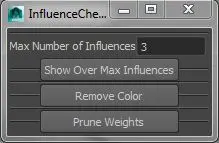
With this script you just punch in the max amount of influences allowed.
Then when you hit the button that says "Show Over Max Influences" it will color them bright red if they have too many influences.
You can either fix them yourself, or hit the prune weights button at the bottom.
To remove the color on your model just hit the button that says "Remove Color"
Showing the color does not affect your existing textures in any way, just make sure you hit the remove color button before rendering.
to run the script, either in the python tab in the script editor, or in a shelf button use this
import InfluencesChecker
reload(InfluencesChecker)
InfluencesChecker.gui()
Please use the Bug System to report any bugs.
Please use the Feature Requests to give me ideas.
Please use the Support Forum if you have any questions or problems.
Please rate and review in the Review section.