-Revised script from MEL to Python
Function:
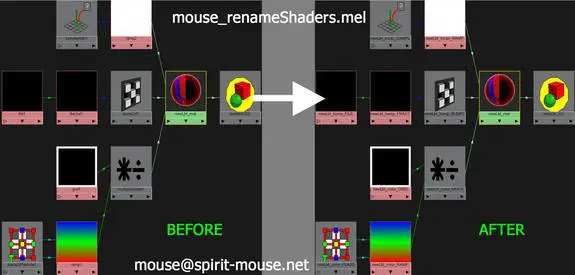
Batch rename selected shader(s) and its associated network with the following format:
shader's name + _connected attributes + _NODE TYPE
The script will work on all maya base shaders, textures, render nodes and mental ray nodes.
Installation:
Unzip spM_renameShaders.py to maya's scripts folder.
(e.g. "C:\Users\user_name\Documents\maya\scripts")
Usage:
To run the script, select shader(s), run the following in Python script editor:
import spM_renameShaders
spM_renameShaders.spM_renameShaders()
The above command can be saved as a Python shelf button.
The script will recognize "_mat" and "Mtl" suffix on the shader(s) and take that off the prefix.
e.g.
shader = "testLambert_mat"
shader's color is connected to "file15"
after running the script, "file15" will become "testLambert_color_FILE"
Any questions, comments or bugs are very welcome.
Please use the Bug System to report any bugs.
Please use the Feature Requests to give me ideas.
Please use the Support Forum if you have any questions or problems.
Please rate and review in the Review section.
Please use the Feature Requests to give me ideas.
Please use the Support Forum if you have any questions or problems.
Please rate and review in the Review section.