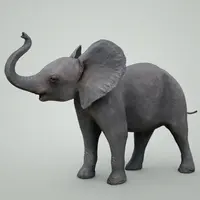
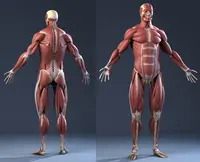
This is freaking awesome rig! The only suggestion I have now is to add 2 more joint controls to the tail. That would make curl in the tail more smoothly. If possible later on add stretchy legs, arms and also in the spine.
**about version 1.1.0?**
1. Every time i turn on the High-Res layer of his body, his head geometry is way out on the right side of the screen away from his body?
2. It would be a nice option if the Medium Res geometry layer had a separate head layer, similar to the proxy layer style.
Ok, since we all agree its good some constructive criticism to make it even better ;)
1. The CtrlRig, bones and proxy mesh should share transform. This way there would be no need for the parent constraints, also when baking out stuff you'd get faster results. As a added bonus you could use the ctrl rig directly for picking what you move enabling you to drop down the visual clutter considerably. Now you could operate the entire rig like the fingers.
Example of this on one single bone:
//warning clears scene
file -f -new;
joint -p 0 0 5 ;
joint -p 0 0 -5 ;
joint -e -zso -oj xyz -sao yup joint1;
polyCube -w 10 -h 1 -d 1;
circle -c 0 0 0 -nr 1 0 0 -sw 360 -r 2;
parent -shape -add nurbsCircleShape1 joint1;
parent -shape -add pCubeShape1 joint1;
move -r -os -wd 5 0 0 pCube1.vtx[0:7];
delete pCube1 nurbsCircle1;
2. Set default manip for all the transforms this saves some time for the animator if the too is set to show manipulator tool. Also if you have click and drag mode this makes it much faster to pose.
3. replace all curve controls with poly equals without shading they are more easy to pick. Unless you put a selection filter override for curves (if so do it instead).
4. the base pivot needs to be able to be keyed easily if you try to meke something like somersaults.
5. the tail yes i agree.
I this was just quick fixes have more things about deeper subjects if the original author would drop me a pm id be glad to discuss this.