
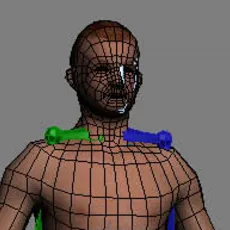
rigging with a biped (3dsmax)
step3
Now we need to assign vertexes to to the bones(skinning) in order to actually be able to animate the character through the biped.
to do this, first assign a physique modifier to you mesh:
select the mesh>modifierlist> Physique

and now apply the physique modifier on the created biped:
physique menu> attach to node> click on the cube in the hips of youre biped>(meny will pop up) intialize

The menu that pop up is basically used to tell physique how to skin your character, how much fall off there is between the bones, how many control points there will be and so fort.
the default settings will do. This is beyond the purpose of this tutorial.
Now the fun begins! move your biped and your character should move allong! (again: make sure you actaully turned of figure mode, or you will not be able to go back to your base pose)
In most cases though, you will get problems with the deformation. Dont worry this is normal. In the next step i will show some ways to solve this.
Comments
-
merci
-
its realy useful tut for bigginers.
-
Really great tutorial!! Very helpful for beginners - just wish the images were there so we could *see* what you were talking about... :/ But thank you for taking your time to write this for all of us, that was very generous of you!