
compositing 101 - if you dont know this it will change your life
4 Comments
Page 1 of 1
Compositing 101: The Black edge
-----
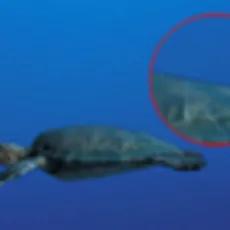
The black edge...that faint line of premultiplied colour can be a devil if nobody has ever shown you how to get rid of it.
Here is your frame turtle_0034

Here is your background sea footage:

The problem is this horrible faint black edge that you can't seem to get rid of:

If you are compositing it for animation you need to select premultiplied when you import the frames into After-effects or whatever compositer you use.

If you are using Photoshop then in the Matting sub-menu there is a remove black matting tool found under layer....

If you do want to know where premultiply is in your render....
Maya software render:

Mental Ray render:

then you have happy turtles:

To those wise experienced compositors...take a moment to share some wisdom...there are a million tuts on how to create scenes and precious few to show you how to assemble them properly....
-andrew
www.dotnamestudios.com
andrew@kerr.name
-----
The black edge...that faint line of premultiplied colour can be a devil if nobody has ever shown you how to get rid of it.
Here is your frame turtle_0034

Here is your background sea footage:

The problem is this horrible faint black edge that you can't seem to get rid of:
If you are compositing it for animation you need to select premultiplied when you import the frames into After-effects or whatever compositer you use.
If you are using Photoshop then in the Matting sub-menu there is a remove black matting tool found under layer....
If you do want to know where premultiply is in your render....
Maya software render:

Mental Ray render:

then you have happy turtles:
To those wise experienced compositors...take a moment to share some wisdom...there are a million tuts on how to create scenes and precious few to show you how to assemble them properly....
-andrew
www.dotnamestudios.com
andrew@kerr.name
Comments
-
hey thanks man. great info. my renders will no longer cause me pain.thanks a lot.
-
great!
-
Thanks!
-
thank u .it great to see the tutorial.