
Dusty Text Created by Goals
Select particle and go to attribute editor
Now set this setting for your particle

Remember in the goal effect each particle put on the one vertex
If you want higher number of particles you must increase the polygon divisions
Max Count = vertex number
In the Goal weights and Objects tab set this value

Step 4:
Create a locator or any object with transform nodes
And animate it from right to left of text in the X axis
Start frame 50
End frame 200

Step 5:
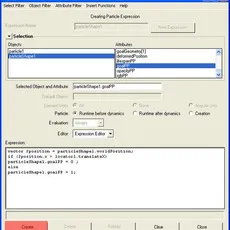
Select the particle go to attribute editor => Per Particle (Array) Attributes
Right click on GoalPP and click the runtime before dynamics expression

Now type this expression in expression editor
vector $position = particleShape1.worldPosition;
if ($position.x > locator1.translateX)
particleShape1.goalPP = 0;
else
particleShape1.goalPP = 1;
Click on create button

Remember if your reference for animate is locator do not change expression
if not you must edit the expression for example
vector $position = particleShape1.worldPosition;
if ($position.x > YOUR REFRENCE NAME .translateX)
particleShape1.goalPP = 0;
else
particleShape1.goalPP = 1;
Step 6:
Select the particle and bind a turbulence Field
Input the following settings:
Magnitude = 100
Attenuation = 0.4
Frequency = 100
And bind a gravity Field
Hide the text
Now play the timeline
The final effect will look like this:

Thank you
Mostafa_rayaneh@yahoo.com