Hi Mickeyboys, sorry to hear you've found a bug.
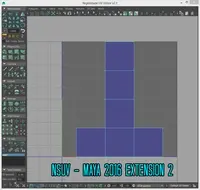
From what i can see in the image i think i know where the tool has stopped.
Could you check to see if you have the Mental Ray plug-in installed and loaded?
If it's not, load it and run the tool again and report back.
Thanks.
No, there is no other way at this stage unfortunately.
The tool relies on temporarily baking ambient occlusion to the vertices on the terrain mesh and then selecting the darkest ones as the interior components to be cut out.
I am currently looking into alternative methods to calculate this but don't have an ETA as of this moment.
Hi,
That's the issue I have.
// Error: file: C:/Program Files/Autodesk/Maya2016/scripts/AETemplates/AEvertexBakeSetTemplate.mel line 114: No object matches name: tmp_vertexBakeOcc.filterSize //
Does this info tells you something?
Thanks,
That does indeed, thanks.
I had tried this script on multiple systems with multiple versions of Maya and had not found that error before.
I have uploaded a new version of the script (1.0.2) that should fix that issue.
Could you please re-download the script and report back on how it behaves.
3d model of arch bridge with highway and simply landscape, The bridge is created on the basis of arch bridge Apollo in Slovakia. rps file (render preset),materials, textures and maps included. Ever...





Comments on this bug:
gemous said over 10 years ago:
mickyboys said over 10 years ago:
gemous said over 10 years ago:
mickyboys said over 10 years ago:
gemous said over 10 years ago:
mickyboys said over 10 years ago:
gemous said over 10 years ago: