
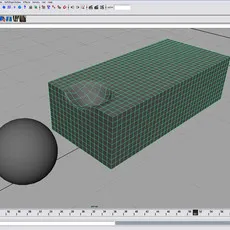
Our next step is to get the sphere to interact with our animated cubes. Select the ball. Choose Fields > Gravity, keep the defaults. (By selecting the ball first and then choosing a field, Maya automatically makes the necessary connections to the ball.) Press play to view the simulation. At this point, the ball just bounces off pCube2. It is ignoring pCube1 all together. Rigid body collision is automatic in Maya 7, but particle collision is not. Select pCube1 and ball. Choose Particles > Make Collide tool options box. Change the options as follows.
Resilience = .5
Friction = .5
Play through the animation again. This time the outer box, pCube1 gets dented where the ball makes contact. Select pCube2 and hide it. To complete the effect hide pCube2 and the particles. (Figure 6)


Watch the results: (QUICKTIME 1)
Comments
-
nice
-
link to video broken
-
Nice tutorial. Quick and to the point. Good job.