
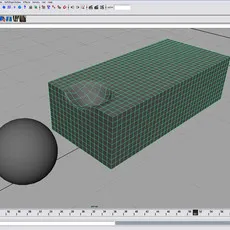
Create a primitive NURBS sphere using the defaults. Rename it to ball.
Transform the sphere. (Figure 1)


Translate X = -4
Translate Y = 5
Scale X = .5
Scale Y = .5
Scale Z = .5
Create a primitive polygon cube using the defaults. We will keep its name, pCube1.
Transform the cube. (Figure 2)


Translate Y = .5
Scale X = 3.5
Scale Z = 1.6
Change pCube1's subdivision inputs. Select the cube and in the channel box select the words polyCube1. Change the following inputs:
Subdivisions Width = 35
Subdivisions Height = 10
Subdivisions Depth = 16
This adds more geometry to the entire cube. The purpose is to provide some detail for our dent. Next, choose Modify > Freeze Transformations and Edit > Delete By Type > History. When dealing with simulation it is important to always make sure your geometry is clean of history and transforms.
Duplicate pCube1 and use its duplicate name, pCube2.
Transform the cube. (Figure 3)


Translate Y = -1
Scale X = .8
Scale Y = .8
Scale Z = .8
Next, choose Modify > Freeze Transformations and Edit > Delete By Type > History.
Comments
-
nice
-
link to video broken
-
Nice tutorial. Quick and to the point. Good job.