





'''
? Platforms: Windows x86-64
? Interface and Environment: Command Line, Autodesk Maya 2012, 2013, 2014, 2015
? Description:
This script allows you to attach one joint hierarchy to another.
For example you can attach using parentConstraint, orientConstraint and pointContraint
actions in a batch manner.
It is not obligatory that joint names in a corresponding
hierarchies have to match up. They can have absolutely different names
but the topology of two joint chains has to be identical.
To install you need to copy dagModule.pyc
to your maya scripts directory:
"\Users\_your user name_\Documents\maya\scripts\"
and use this python commands to run it:
import dagModule
dagModule.batchConnect()
To have it on your shelf just create a shelf button with the above commands.
? Usage:
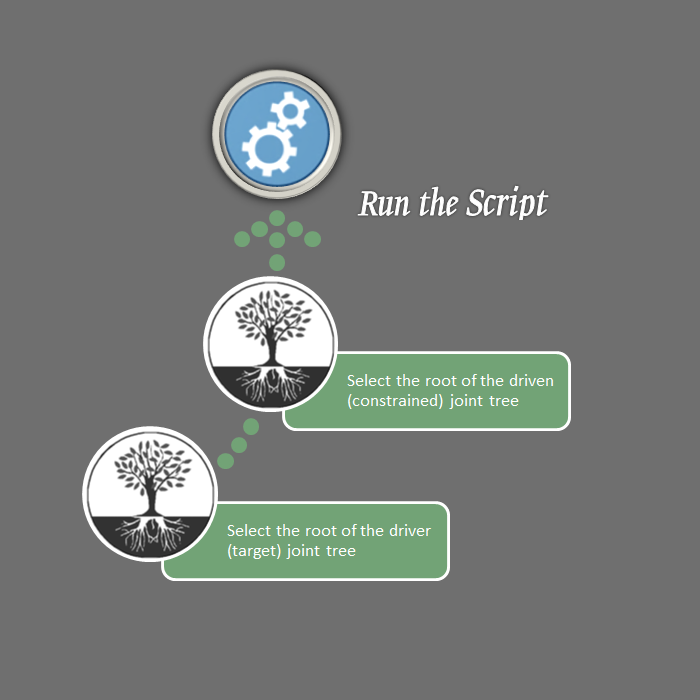
Select joint chains roots and run the script.
Selection order:
1) Root of the driver (target) joint chain.
2) Root of the driven (constrained) joint chain.
? Flags:
Note: layer(l) flag is not implemented.
All other flags below are exactly the same as Maya Python or MEL provides.
long name(short name) <argument types> Interpretation and default values:
"parentConstraint"
weight(w) <float> Sets the weight value for constraints. If not given, the default value of 1.0 is used.
maintainOffset(mo) <boolean> Specify whether the position and rotation of the constrained objects will be
maintained or not. The default value is True.
skipTranslate(st) <string> 'none' is used by default. This means that all translation axes will be constrained
but you can skip all or some of them. Valid values are 'x', 'y', 'z'.
skipRotate(sr) <string> 'none' is used by default. This means that all rotation axes will be constrained
but you can skip all or some of them. Valid values are 'x', 'y', 'z'.
"pointConstraint", "orientConstraint"
weight(w) <float> Sets the weight value for constraints. If not given, the default value of 1.0 is used.
maintainOffset(mo) <boolean> Specify whether the position or rotation (depends on the constraint type)
of the constrained objects will be maintained or not. The default value is False.
offset(o) <[float, float, float]> If maintainOffset(mo) flag is False you can specify the value of the offset.
Default is [0.0, 0.0, 0.0].
skip(sk) <string> 'none' is used by default. This means that all translation or rotation axes
(depends on the constraint type) will be constrained but you can skip all or some of them.
Valid values are 'x', 'y', 'z'.
"scaleConstraint"
All flags are the same as for "pointConstraint", "orientConstraint" type
except that the offset(o) flag default value is [1.0, 1.0, 1.0]
The usage of batchConnect() without any flags at all executes parentConstraint command with values by default
as it does through Maya editor UI (weight = 1.0, maintainOffset = True) with constraining to all
translation and rotation axes but without applying to any animation layer.
? Examples:
from dagModule import batchConnect
# batch orient constraints weighted in 0.1 with offset by 45 degrees about X and ignoring of Y axis
batchConnect("orientConstraint", w=.1, offset=[45,0,0], sk='y')
# batch point constraints weighted in 1.0 only by Y axis and maintain the position of constrained objects
batchConnect("pointConstraint", w=1, maintainOffset=True, sk=['x','z'])
# batch scale constraints with weight is equal to 2.5 and maintain the scale of constrained objects
batchConnect("scaleConstraint", w=2.5, mo=True)
# batch point, orient and scale constraints with defaults, see the paragraph about flags above
# notice that in contrast to parentConstraint a maintainOffset flag is False by default
batchConnect("pointConstraint")
batchConnect("orientConstraint")
batchConnect("scaleConstraint")
# all 4 lines below are equivalent
batchConnect()
batchConnect("parentConstraint")
batchConnect("parentConstraint", weight=1.0, mo=True)
batchConnect("parentConstraint", w=1, maintainOffset=True, st='none', sr='none')
'''
? Platforms: Windows x86-64
? Interface and Environment: Command Line, Autodesk Maya 2012, 2013, 2014, 2015
? Description:
This script allows you to attach one joint hierarchy to another.
For example you can attach using parentConstraint, orientConstraint and pointContraint
actions in a batch manner.
It is not obligatory that joint names in a corresponding
hierarchies have to match up. They can have absolutely different names
but the topology of two joint chains has to be identical.
To install you need to copy dagModule.pyc
to your maya scripts directory:
"\Users\_your user name_\Documents\maya\scripts\"
and use this python commands to run it:
import dagModule
dagModule.batchConnect()
To have it on your shelf just create a shelf button with the above commands.
? Usage:
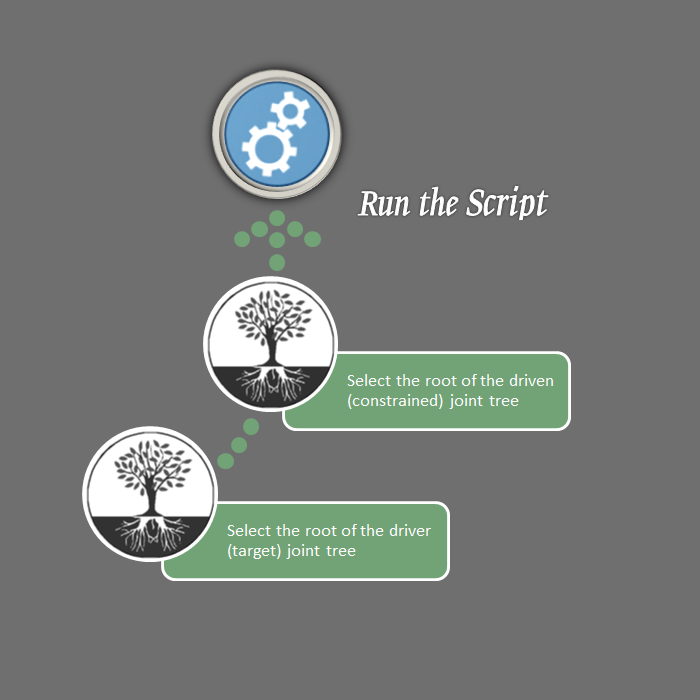
Select joint chains roots and run the script.
Selection order:
1) Root of the driver (target) joint chain.
2) Root of the driven (constrained) joint chain.
? Flags:
Note: layer(l) flag is not implemented.
All other flags below are exactly the same as Maya Python or MEL provides.
long name(short name) <argument types> Interpretation and default values:
"parentConstraint"
weight(w) <float> Sets the weight value for constraints. If not given, the default value of 1.0 is used.
maintainOffset(mo) <boolean> Specify whether the position and rotation of the constrained objects will be
maintained or not. The default value is True.
skipTranslate(st) <string> 'none' is used by default. This means that all translation axes will be constrained
but you can skip all or some of them. Valid values are 'x', 'y', 'z'.
skipRotate(sr) <string> 'none' is used by default. This means that all rotation axes will be constrained
but you can skip all or some of them. Valid values are 'x', 'y', 'z'.
"pointConstraint", "orientConstraint"
weight(w) <float> Sets the weight value for constraints. If not given, the default value of 1.0 is used.
maintainOffset(mo) <boolean> Specify whether the position or rotation (depends on the constraint type)
of the constrained objects will be maintained or not. The default value is False.
offset(o) <[float, float, float]> If maintainOffset(mo) flag is False you can specify the value of the offset.
Default is [0.0, 0.0, 0.0].
skip(sk) <string> 'none' is used by default. This means that all translation or rotation axes
(depends on the constraint type) will be constrained but you can skip all or some of them.
Valid values are 'x', 'y', 'z'.
"scaleConstraint"
All flags are the same as for "pointConstraint", "orientConstraint" type
except that the offset(o) flag default value is [1.0, 1.0, 1.0]
The usage of batchConnect() without any flags at all executes parentConstraint command with values by default
as it does through Maya editor UI (weight = 1.0, maintainOffset = True) with constraining to all
translation and rotation axes but without applying to any animation layer.
? Examples:
from dagModule import batchConnect
# batch orient constraints weighted in 0.1 with offset by 45 degrees about X and ignoring of Y axis
batchConnect("orientConstraint", w=.1, offset=[45,0,0], sk='y')
# batch point constraints weighted in 1.0 only by Y axis and maintain the position of constrained objects
batchConnect("pointConstraint", w=1, maintainOffset=True, sk=['x','z'])
# batch scale constraints with weight is equal to 2.5 and maintain the scale of constrained objects
batchConnect("scaleConstraint", w=2.5, mo=True)
# batch point, orient and scale constraints with defaults, see the paragraph about flags above
# notice that in contrast to parentConstraint a maintainOffset flag is False by default
batchConnect("pointConstraint")
batchConnect("orientConstraint")
batchConnect("scaleConstraint")
# all 4 lines below are equivalent
batchConnect()
batchConnect("parentConstraint")
batchConnect("parentConstraint", weight=1.0, mo=True)
batchConnect("parentConstraint", w=1, maintainOffset=True, st='none', sr='none')
'''
Please use the Bug System to report any bugs.
Please use the Feature Requests to give me ideas.
Please use the Support Forum if you have any questions or problems.
Please rate and review in the Review section.
Please use the Feature Requests to give me ideas.
Please use the Support Forum if you have any questions or problems.
Please rate and review in the Review section.


