
Maya Tutorials
Tutorials Categories
- Animating (23)
- Character (30)
- Development / API (5)
- Dynamics / FX (43)
- Games Related (1)
- General (14)
- Import / Export (6)
- Modeling (41)
- Paint FX (8)
- Rendering / Lighting (72)
- Scripting (28)
- Texturing (19)
- Using Tools / Scripts (12)

Dave Ks Poly Head Modeling Tutorial
Dave K's Poly Head Modeling TutorialBy Dave KomorowskiOk� I've put this off for a long time, so I've finally decided to sit down and write a tutorial on modeling. After going through tutorial after tutorial on modeling in poly's/sub-d's, I've come up with a workflow that works very well for me an...

A Designers Tutorial in using Image Based Illumination and High Dynamic Range Imagery
A Designer's Tutorial in using Image Based Illumination and High Dynamic Range ImageryBrock J. StearnDepartment of Industrial, Interior and Visual Communication DesignThe Ohio State UniversityIntroductionThis tutorial follows a pipeline using Image Based Illumination and High Dynamic Range Imager...

Real Time Character Modeling Tutorial
Below is a short tutorial showing the method I use when modelling a real time character. This approach can also be adopted when creating subdivision surface models. I hope some of you find it informative and useful. A summary of the key points that this tutorial will cover: * Start with good refe...

Conversational MEL Part 3
Conversational MEL Part 3 www.NimbleStudiosInc.com Topics Covered: Online MEL command reference; query and edit mode flags; UI layouts; sliders Sample Script: Basic turntable animation and UI Introduction In the past two articles we've covered a lot of MEL: commands, flags, variables, arrays, and...
Maya To XAML- Exporting a Character with Textures
Exporting a Model with Textures and MaterialsThis article illustrates the Maya To XAML plug-in, emphasing successful export of model data with textures. Please note that the plug-in is still in the development beta and still requires a small amount of cleanup before you have the ability to ...
Conversational MEL Part 1
Conversational MEL Part 1 www.NimbleStudiosInc.com info@NimbleStudiosInc.com Topics Covered: MEL commands, flags, and argument; Maya scripting UI; Sample Script: A window to hold common tasks This is the first of several tutorials on MEL. We�ll be starting from the very beginning with this articl...
Conversational MEL Part 2
Conversational MEL Part 2 www.NimbleStudiosInc.com info@NimbleStudiosInc.com Topics Covered: variables; arrays; assignment; return values; basic loop; Sample Script: Node name search and replace Introduction When we left off, we�d combined a pinch of cut-and-paste with a dash of basic UI to build...

Particle Replacement of Geometry Script
Particle Replacement of Geometry Script a script designed to implement NPR techniques in Maya The Idea The original idea came from looking at Barbara Meier's Painterly Rendered techniques and her Haystack images. Her technique was to use particles to represent the geometry and each ...
Using Mayas Pick Walk Functionality
Tutorial: Using Maya's 'Pick Walk' Functionality It sometimes surprises people that Maya uses the left/right keys to change the current selection instead of stepping back and forth in time. With the default key mappings 1, the up/down/left/right arrow keys are used to change the selection within ...

Animating a Run Cycle
Run Cycle Autor: Rodri Torres | Date: Agosto 2.005 | Translation: Francesco Campobasso | Revision: 0.4 This document explains how to create a run cycle working with curves. This workflow can be used in any 3D software able to work with animation curves.The axes mentioned in this document can vary...
The Unix Shell for vfx artists
Tutorial: The Unix Shell for VFX Arteeests If you're using a Unix based operating system such as Linux then you're going to need to know your way around a unix shell. The shell is where you manage your files, and run utilities and applications. As an artist you may think you don't need to know ab...

Particle Emission when objects collide
A commonly needed effect is the emission of particles at the exact location of object collision. For example, as a sword scrapes along a wall we may need sparks; As a boulder rolls down a mountainside we may need smaller instanced rocks and pebbles to appear; As a character walks along a dirtroad...

Pen writing on paper (Maya paint effects)
It is relatively easy to animate a line of written text, but it can be tricky to exactly track the pencil point to the line as it writes without resorting to lots of keyframes. The following technique allows the pencil to automatically lock to the end of the emerging paint effects line. Here is a...

Creating a dynamic telephone cord using Maya Hair
phoneChord.aviScene File: phoneChord.zip This file shows a simple and fast method for creating a dynamic phone cord using Maya Hair. 1. Model the phone and receiver and a curve that defines the start position of the cord. The cvs on the cord should be evenly spaced and the first cvs should be at ...

Create a gear and render it realisticly with Mental Ray
First, go to your modelling toolset, polygons>tool options> and make sure keep faces together is checked.Also you will be needing an HDRI map for this tutorial, please e-mail me at bartonix@gmail.com and state in the subject of the e-mail APT_PROBE.HDR so I know which hdri map you're needin...

How to model a screwdriver and render it with mental ray
This is a basic modelling tutorial that will teach you how to make a screw-driver and render it with FG (Final Gather) With global illumination, HDRI (High dynamic ranged imagery) And DoF (Depth of field, optional).Let us begin shall we, open Maya, and go to the modelling section. Now create a po...
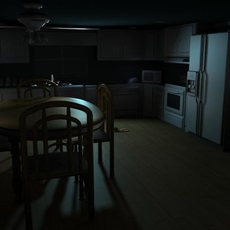
Faking Global Illumination
Faking Global Illumination with point lightsThis handout will explain how to use point lights to light a scene and give it the same look as using global illumination. The overall quality is similar, it is easier to do, and best of all, it renders faster. I used a night time kitchen scene from a s...

The Fisheye Camera
1. Turn on Raytracing (go to the Render Global window either from the Render View portal or under Window-> render globals) 1a. If you have objects in your scene that you'd like to be reflective you must set the Ray Tracing Reflections option to at least "2) 2. Create a scene to view. 3. Create...
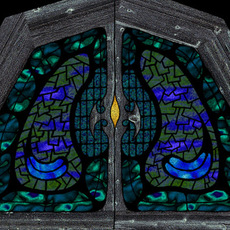
Texturing Resolution Tips
A common question when new to texture mapping, is what resolution should textures be? This is assuming that you are going to be making your own in a 2D package, such as Photoshop, either from scratch or from a scan. Well, the first thing to do is ignore dpi settings. All you care about is the pix...
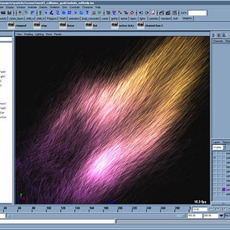
Using particle Speed
There are situations where a phenomenon's velocity or speed is related to it's behavior or appearance. Perhaps the incandecence increases as a particle moves faster... or the color changes from blue to red. Perhaps some dust is resting on an object, but once it gets blown away it also begins to d...

Understanding Continuity
Continuity applies to both curves and surfaces. It simply refers to how two curves meet at a point, or how surfaces meet at an edge. When using a patch-modeling approach, where a character, vehicle or whatever are modeled from a series of patches, like a quilt, one wants to avoid visible seams be...

Spotlight Fog
Here's a common problem... you add fog to a spotlight, render an image and... no fog. The problem is simple and is inherit to how Maya calculates lightfog. Above we see a simple scene with a single spotlight. No fog added yet. The thing to notice is how once fog has been added to the light, a new...

Facial Animation Rig for Delgo
I am Warren Grubb, Animation Director for Fathom Studios on the film Delgo. (click here for the trailer) When we R&D for the feature film Delgo, I was Technical Director and I knew we would need a facial rig for our characters that was more powerful and flexible than standard multi-targeted b...
Wireframe Render
Wireframe Rendering in MayaThis tutorial will show you how to create a shader that will render a wireframe of your model and not render the backfacing wireframes. Before following the steps below, unwrap your mesh.1. Take a snapshot of your UVs.2. Create a shader node of your ch...
Build plugins with Visual C++ Express Edition
Here is how I was able to setup Visual C++ Express Edition to compile a simple helloWorld plugin for Maya.1. Download and install VCEE here using their instructions:http://msdn.microsoft.com/vstudio/express/visualc/download/2. Find the MayaPluginWizard2.0.zip in your installation folder and...