
H3D Tutorials

Unwrapping with Texporter
In this small tutorial, I will try to demonstrate the easy use and flexibility of TEXPORTER, (free plugin) with two simple planar maps, an alternative for who doesn't want to spend a long time "sewing" unwraps. You will know one of the simplest and most effective ways of mapping an object. For th...

Realistic Eye Modeling for 3D Characters
I'm posting a very simple tutorial on how to model and apply shaders to get realistic eyes, the "windows of your character's soul". A lot of times, bad eyes can "kill" your character literally, even if it has the most perfect modeling of the world. The importance of the eyes is exactly this: give...

Realistic Ear Modelling
Translation thanx to Mihai Pocorschi III - www.antena1.ro.This tutorial is mainly aimed at those users with experience in polygon modeling.Poly-by-poly is a modeling technique that involves constructing the polygons one by one, aiming at drawing the "edge-loops" of the object, similar to spline m...

Subdivision Modeling of a Human
Subdivision modeling is a procedure for creating smooth mod- els while keeping the total polygon count at a low level. Point counts are small so that the sculpting process is less confusing. New software developments, such as those in Maya and XSI, offer more robust subdivision modeling tools, an...
Modeling a POLYGON Head
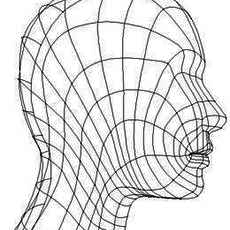
Chapter 7The Structure of the Head and FeaturesModeling a POLYGON HeadUPDATEDCopyright 1999 Peter Ratner(Excerpt from Mastering 3D Animation)There are many approaches to modeling the human head. Most of these methods were designed to accomplish specific goals such as easier sculpting of facial fe...

How to create a realistic looking turtle - Modelin
How to create a realistic looking turtle - Modeling part 1by Denis Zen/artists/2.3d#denis_zenfiles.zipWhat follows is the first part of a tutorial which will show you how to model, texture, illuminate and animate a turtle. At the end your turtle should look like the one in the picture below:Ready...

Modeling a Human Ear
I'm doing this tutorial because there seems to be a lack of ear tutorials on the web. At least it seems that way to me. I'm certainly not the best modeler out there, and this may not be the best way to do it, but it does the trick and is pretty easy to do and should work with whatever software yo...

Process for Modeling a (poly) Sub Division Head
This �tutorial� is for Maya version 3. It will work with Base, Complete, or Unlimited. This tutorial is aimed at the intermediate user who is familiar with Maya, and has a basic understanding with Subdivision surfaces.NOTE!!!! This �tutorial� is not conclusive. It is designed to demonstrate a wor...

How to split a polyset into individual polys:
1) Go into component mode and pick all of the poly facets that you want to split off of the original polyset. 2) Polygons > Facets > Extract 3) Polygons > SeparateThis will create a group node that contains each individual poly. You can then select all of those polys as objects and make ...
Modeling a Bottle
Modeling a BottleAll righty, a modelling tutorial. A shampoo bottle. I am gonna try to hold your hand as much as possible, because that is the way I like it You will get discouraged, you will weep, you will cry, you will curse. But don�t dispair, at the end it will work. So c�mon brave lads, foll...
Faked polygonal MetaBalls / Objects
Create two polygon primitives of your choice with low poly count.Select them, make a polygonal boolean operation (Polygons - Booleans - Union, you can change the operation type afterwards).Select the resulting polySurface and smooth it (Edit Polygons - Smooth),edit polySmoothFacet divisions Attri...

Seamless Modeling in Maya part1 - An Introduction
1. Introduction(seamless modeling in Maya)"This tutorials is result of my research work in the area of character modeling and animation."Michael Bazhutkin is animator of video studio at Soros Foundation-Kyrgyzstanweb site: www.geocities.com/bazhutkine-mail: misha@soros.kgClick on pictures for vie...

Seamless Modeling in Maya part 2 - Heads, Hands, C
2. Head, hands, cloth(seamless modeling in Maya)"This tutorials is result of my research work in the area of character modeling and animation."Michael Bazhutkin is animator of video studio at Soros Foundation-Kyrgyzstanweb site: www.geocities.com/bazhutkine-mail: misha@soros.kg Click on pictures ...

Seamless Modeling in Maya part 3 - Dogs Body
"This tutorials is result of my research work in the area of character modeling and animation."Michael Bazhutkin is animator of video studio at Soros Foundation-Kyrgyzstanweb site: www.geocities.com/bazhutkine-mail: misha@soros.kgClick on pictures for view of big pictures.The dog is a copy-model ...

How to patchmodel a head in Maya
One of the most common question for beginners in 3d is how to model a head.Wich technique is the best? Polygons, Nubs, Subdivision surfaces?All techniques has it owns advantages but the one that has most unansweredquestions is Patch-modeling. Everyone has heard of it but few really knowsthe workf...

Creating an Eyelash
1. First attach the two topsurfaces of the eyewith the connect option.2. Make the surface live and draw a cv-curve on it,representing the base of the eyelash.3. Model a single hair4. Move the pivotpoint to the base and animate the hairobject (over about 100 frames) along the path you just created...

Subdivision Surface Modeling Tutorial
This tutorial is for Maya 2.5. It will work with Base, Complete, or Unlimited. This tutorial is aimed at thebeginner to intermediate user who is familiar with Maya, but has never used Subdivision surfaces.DisclaimerUse at your own risk. Author is not responsible for anything. If you can somehow d...
Modeling a Head with Subdivision Emulation in Maya
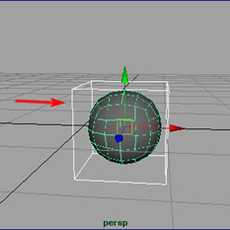
Perhaps I should preface this tutorial by acknowledging that many different methods exist for creating 3D characters for broadcast. To date, probably the most popular method has, in my estimation, also been the most complex one - that is, modeling with the use of NURBS surfaces. In the past, NURB...

Multi-Patch Model Tesselation
When Maya renders a NURBS surface, the object is tesselated into triangles (polygons). Understanding tesselation is crucial to clean silhouettes and patch boundary relationships. There are several options for tesellation, but this quick tutorial is dealing with multi-patch models.Above we have a ...

Patch Model a Head in Maya - Part 1
This tutorial covers the modeling of a sci fi creature head using the popular technique of NURBS patches. Models consisting of NURBS patches is the most common appearance used in films, based on several reasons: NURBS can have infinite resolution, meaning it retesselates depending on distance fro...

Patch Model a Head in Maya - Part 2
Step 11.Remaining surfaces to be done of the actual head are the inside of the mouth. Turn the view so that you can see the inside, then extract every edge isoparm of the lips (go 'Edit curves - duplicate surface curves') - see figure 21.Duplicate these as well. Before moving them you will need t...

Modeling Using Connect Poly Shape
After receiving a few requests to write a tutorial on my technique for modeling a head in Maya, I've decided to demonstrate exactly how I would go about making one. When modeling a head in maya, you always want to result in a detailed, yet clean model. Nurbs patches are a great way to get this ef...

Modeling a NURBS head (General Concept Tutorial)
Chapter 7The Structure of the Head and FeaturesModeling a NURBS HeadUPDATEDCopyright 1999 Peter Ratner(Excerpt from Mastering 3D Animation)There are many approaches to modeling the human head. Most of these methods were designed to accomplish specific goals such as easier sculpting of facial feat...

Modeling a Star Wars Walker
StarWarsThe purpose of this tutorial is modeling a Walker in a better and faster way than people at ILM can, so you can steel their job, get George Lucas fired, and create new job postings in 3d productions houses...Of course, the 3d model comes first.we'll actually model two walkers with differe...
Organic Modeling and Animation - Part One (Modelin
This article was printed in the 1998 siggraph issueof 3D Design magazine, for an article Alex Alvarez wrote entitled 'Organic Modeling and Animation in Maya V.1',Alex is director and instructor at Gnomon Training Center, a HIGHEND3D.COM strategic partner. Alex teaches advancedacharacter nimation ...